How to start a staffing agency in the UK
Start with the client and the site, not with a logo. Pin the site, publish the shifts the temp should see, let them clock in when they arrive, and have the client approve the hours. Pay, invoices and the 12-week clock stay outside the rota.
The first week is a site, not a brand
A staffing agency lives or dies on whether the temp was at the client's site, and whether the client agrees the hours. The website, the terms and the insurance matter, and they are not this article. This article is the week you can actually run: one client, one pin, one published shift, one approval.
Checked against GOV.UK on 23 October 2026. The agency workers page is the source for who counts as an agency worker. The equal treatment page is the 12-week rule. Neither page is a software feature.
Name the client and pin the site
Add the client first. Then add the site where the work happens. Clock-in stays closed until that site has a pin. The default radius is 100 metres. You can set it from 25 to 1000 metres. A reading coarser than 100 metres is ignored. A punch outside the pin is refused, unless the organisation is set to flag the punch instead, in which case a reason is required and the punch is flagged.
The pin is the door, not a tracker. The phone is read when the person clocks in or out. It is not followed between punches. There is no photo.
Publish the shift before you talk about hours
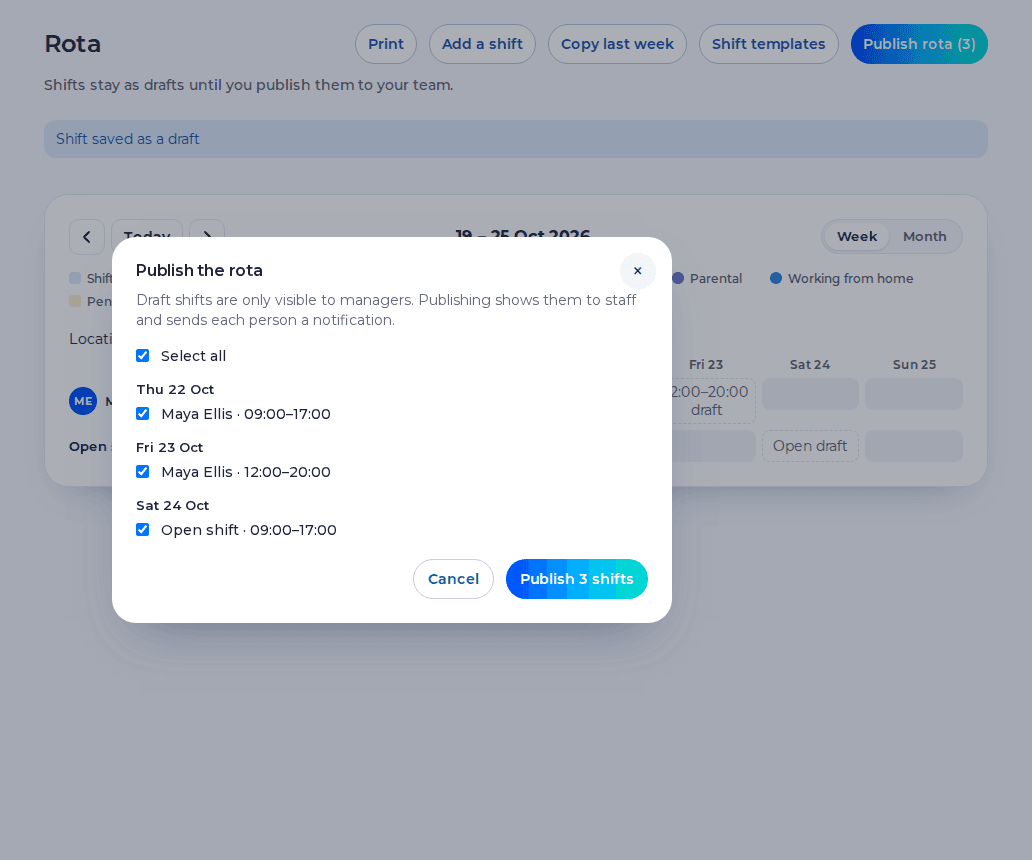
Place the temp on a shift at that site and publish it. A draft stays off their phone. An open shift is a gap with no name, once it is published. On an agency account the clock offers only client sites that person is assigned to, or rostered on today. It does not offer another client's sites.
A time a manager types in needs a note, and it is flagged. That is the honest record of a missed punch. It is not a way to invent a day.
Ask the client to approve, then lock
The client gets a free login and sees that client's sites only. They approve a shift, or they reject it with a reason. Approve does not need a comment. Their approval does not lock the week. You lock it afterwards. Approved hours download as a CSV. The file is hours. Shiftbrook does not raise an invoice and does not pay the worker. Approved hours can be sent to Xero Payroll UK as draft timesheets on the paid plan. Shiftbrook does not approve a pay run.
There is no weekly email that chases the approver. If the hours are still waiting, you can see that, and you contact the client yourself.
The price, said once
The first organisation is free for up to 5 staff. The paid plan is £3 per user per month, with a £15 minimum. You can use the paid plan for 14 days before the first payment, and that period does not ask for a card. On an agency, staff and managers are the active workers. Owners, admins, HR and client approvers are not charged. Someone who has left, and someone who is paused, is not billed. Ten active workers is £50 in a month. Forty is £200. One hundred and fifty is £750. The minimum is £25, which is five workers.
What you still do yourself
Who employs the person is the contract. The Agency Workers Regulations give equal treatment after 12 weeks in the same job. Shiftbrook does not count those weeks. Umbrella companies can leave an agency jointly liable for PAYE from 6 April 2026. Shiftbrook does not operate PAYE. A Key Information Document is a document you give the worker. The product does not issue it.
The agencies page is the product described without the startup advice. Client approval is the sign-off step on its own.
The message the temp actually gets
The invite is an email. There is no text message. It points at the install page, which is the web app, and it tells the person to clock in at the client site and to open Rota for published shifts. Questions about the placement go to you. The client is not their helpdesk. A draft never appears in that list. If you have not published the week, they have nothing to arrive for.
You can add the temp before the approver is invited. Client sign-off is on the paid plan. The first organisation is free for up to 5 staff. The paid plan is £3 per user per month, with a £15 minimum. You can use the paid plan for 14 days before the first payment, and that period does not ask for a card. Inviting the approver does not begin that period. If you have already used it, the invite stays closed until the plan is paid.
The paper and digital comparison is the clipboard this sequence replaces. Client sign-off is the step after the clock.
What this means for your rota
Write the client's week as shifts on their site. Publish the ones the temp should see. Leave drafts off the phone. When the client rejects a shift, the reason sits on the timesheet, and you change the next week rather than arguing in a chat thread. The rota is the record of what was offered. It is not the invoice and it is not the contract of employment.
Does Shiftbrook tell me who the employer is?
No. The contract decides. The product records the placement, the clock and the approval.
Can I add the client before anyone is paid for the software?
Yes. Clients and sites can be added first. Client sign-off is on the paid plan. The first organisation is free for up to 5 staff.
Does the product count the 12-week qualifying period?
No. The Agency Workers Regulations guide explains the rule. Shiftbrook does not run a counter.
Related
The first organisation is free for up to 5 staff. The paid plan is £3 per user per month, with a £15 minimum. You can use the paid plan for 14 days before the first payment, and that period does not ask for a card. An agency pays £5 per active worker per month, with a £25 minimum. Client approvers are free and do not count.
Start free Log inGeneral guidance for UK employers, not legal advice.